Presentation
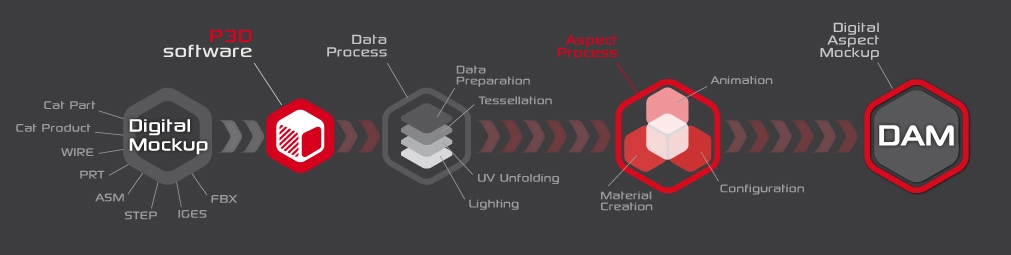
Lumiscaphe’s Patchwork 3D software suite enables organizations to convert their original CAD data to Digital Aspect Mockups (DAMs) or to static images and dynamic renderings while maintaining complete in-house control over the process. Permanent data access is assured through local storage or via a Product Lifecycle Management (PLM) system.
Patchwork 3D Design is complete DAM production tool built to meet the needs of engineering and marketing.
Through its synchronization of the DAM with the PLM system during the entire product lifecycle, Patchwork 3D Design is particularly suited for perceived quality reviews and for production of marketing imagery.
The Patchwork 3D Design interface is divided into two modules :
- Shaper provides all of the features required for importing, optimizing, and preparing 3D models.
- Matter provides the tools used to create a DAM through aspect dressing and the creation of a scene around a model, including but not limited to the creation and modification of materials.
About Lumiscaphe
Lumiscaphe helps to strategically connect the design and engineering worlds with marketing and sales support by developing and publishing innovative hybrid solutions employing the Digital Aspect Mockup (DAM) and photorealistic, real-time 3D rendering.
Lumiscaphe provides 3D visualization solutions built on solid experience in real-time rendering technology. Lumiscaphe’s range of specialized products includes online and offline 3D product configurators, applications and content created for the web and for mobile devices, as well as tools for publishing and sharing. For creators, a software development integration kit is also available.
Lumiscaphe’s clients are found in the automotive, aerospace and luxury goods industries, as well as in the architecture world and in the product design community.
Founded in Bordeaux in 2001, Lumiscaphe has become an innovative actor on the worldwide technology market. With offices today in Paris, San Francisco and Tokyo, Lumiscaphe is proud to provide its solutions to its clients directly or through a network of certified partners.
About This Documentation
This documentation describes the interface and features in Patchwork 3D Design. It begins with a presentation of the new features, the hardware requirements, and a short section on how to get started with Patchwork 3D Design.
This document is organized by topic. It does not need to be read in order, and you do not need to read it from cover to cover unless you want to.
Interface Text
Text in the interface and shortcut keystrokes are written differently so that they will be easy to see. They appear like this in the text.
Links
You will also see hyperlinks in the text. This is an example of a link to
Boxes
Step-by-Step Instructions
When step-by-step instructions are given, they are formatted as a numbered list:
- This is the first step.
- This is the second step.
- This is the final step.
Images of the Interface
Unless otherwise indicated, all images in this text use the default interface theme, Dark. If you are using a different interface theme, the colors on your screen will be different. However, the windows, the interface text, and the symbols on the icons remain the same no matter what theme you choose.


