Navigating the history
This list of actions allows you to visualize, for a loaded state, the order in which the actions were evaluated to calculate the current state. By activating the eye icon  you can activate or deactivate a state, and the result will be automatically updated in the 3D Digital Backbone and in the open Blender session.
Here is an example of the history of actions resulting from the collaboration between Rory and Amy.
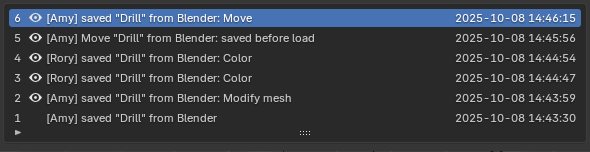
In order of evaluation, the actions evaluated are:
User [Amy] saved the data “Drill” from Blender.
User [Amy] saved Blender's modified “Drill” data with the tag [Modify mesh].
User [Rory] saved Blender “Drill” data with the tag [Color].
User [Rory] saved Blender “Drill” data with the tag [Color].
User [Amy] tried to load, so her work was saved first.
User [Amy] saved Blender's modified “Drill” data with the tag [Move].