Raytracing Settings (Editor)
Notice
Available in: Matter: left toolbar > |

Ray tracing calculates how light propagates and bounces (reflection, refraction) in the scene to obtain a true-to-life image.
The Raytracing Settings window contains all parameters needed to configure the rendering.
Rendering

In the Rendering box, the adjustable parameters are:
Parameter | Description |
|---|---|
Mode | Selects the rendering engine between the Ray tracing and Path tracing. Use the Enable GPU Ray Tracing rendering |
Min samples | Sets the number of times a pixel is recalculated to reduce noise. The higher the number, the sharper the image will be, though it will also increase the rendering time. |
Global illumination | Activates the calculation of light bounces between surfaces, such as reflected light from a colored wall, and slightly illuminates a nearby object. Global illumination greatly improves the realism of the scene at the expense of rendering time. |

Adaptive Sampling

The Adaptive Sampling option adjusts the number of samples per pixel according to the complexity of the scene.
Parameter | Description |
|---|---|
Noise threshold | Defines noise tolerance: the higher the value, the noisier the image will be. |
Minimum number of samples | Sets the minimum number of samples received per pixel before applying adaptive sampling. In other words, it guarantees a minimum number of samples per pixel to ensure basic quality before optimization. |
Denoiser

The Denoiser uses AI to remove noise from images.
Parameter | Description |
|---|---|
Minimum number of samples | Sets the minimum number of samples received per pixel before applying the denoiser. In other words, it guarantees a minimum number of samples per pixel to ensure basic quality before optimization. |
Tip
To maintain a natural look with the denoiser, leave enough samples/path traces before activating the denoiser to avoid smoothing too early.
Ray Rebounds

In the Ray Rebounds box, the adjustable parameters are:
Parameter | Description |
|---|---|
Min Ray Depth | NoteOnly available for the Path tracing. Sets the minimum number of bounces before the ray is stopped if its contribution is too low. |
Max ray depth | Sets the maximum number of rebounds to reach. |
Tip
To achieve a compromise between the desired quality and rendering time, start by defining the Max Ray Depth to achieve, which, depending on the settings, affects the calculation time.
Reflections
Note
Available for Ray tracing only.
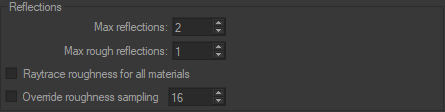
In the Reflections box, the adjustable parameters are:
Parameter | Description |
|---|---|
Max Reflections | Maximum number of reflections allowed during calculation. |
Max Rough Reflections | Maximum number of rough reflections allowed during calculation. |
Raytrace roughness for all materials | Activates the calculation of the roughness by ray tracing for all materials without taking into account the parameters set in the Raytracing tab from the Materials editor. |
Override roughness sampling | Allows you to ignore the roughness sampling value set in the Raytracing tab from the Materials editor. This applies to all materials. |
It should be noted that setting the maximum number of rough reflections and transmissions to a high value will drastically increase computation time. Rough reflections and transmissions exponentially increase the number of traced rays. If a ray is sent through a ground glass with a transmission roughness value set to 100, 100 rays will be generated for the first hit, and then 100 other rays will be generated when each of these rays will touch the rear face of the glass. More than 10000 rays will be therefore used to compute a single pixel. The Max Rough Reflections and Max Rough Transmissions parameters should thus be used with caution to reduce computation time.
When a pixel is rendered, reflections and transmissions are computed until Max Recursion level, Max Reflections, or Max Transmissions is reached. The End of course color parameter from the last material hit is then used to determine if either a predefined color or the environment should be used to compute the render. The End of course color parameter is set in the Raytracing tab of the Material editor.
Transmissions
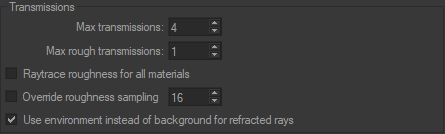
Similarly, the following parameters can be set in the Transmissions box:
Parameter | Description |
|---|---|
Max Transmissions | Maximum number of transmissions allowed during calculation. |
Max Rough Transmissions | Maximum number of rough transmissions allowed during calculation. |
Raytrace roughness for all materials | Activates the calculation of the roughness by ray tracing for all materials without taking into account the parameters set in the Raytracing tab from the Materials editor. |
Override roughness sampling | Allows you to ignore the roughness sampling value set in the Raytracing tab from the Materials editor. This applies to all materials. |
Use environment instead of background for refracted rays | Conditions the behavior when rays pass through a transparent surface. When activated, the refraction of rays that pass through a transparent surface redirects them to the light environment rather than to the background. In cases where there is a significant color difference between the light environment and the background, this may cause unwanted effects. Therefore, it is possible to ignore the refraction of rays passing through transparent surfaces by unchecking this. |